What's in here
- What VanVerdict actually is
- Getting started
- Planning your show day
- Starting a caravan record
- Capturing at the van
- The checklist
- Can you legally tow it: Tow Match
- Your Buyer Profile and Fit Score
- The evening review
- Comparing your shortlist
- Quotes, and getting it in writing
- The Van Report: price history and the quoted range
- Find a van by what matters to you
- The Buyer Report and handover checklist
- Asking the AI about a caravan
- Shopping with a partner
- Plans and what each one unlocks
- Common questions
1. What VanVerdict actually is
After the third or fourth caravan at a show, they start to blur together. The layout you liked was in van two. The price that seemed fair was on van five. The thing the salesperson promised, was it for this one or the last one.
VanVerdict is a buyer-side caravan assistant. It remembers what you saw, what you were told, what you photographed, and what it cost, van by van, so that a week later you can still tell them apart and compare them properly.
It does not sell caravans, list caravans, or work for a dealer. It works for the buyer. That is the whole design brief.
The journey the app is built around: Plan it. Inspect it. Remember it. Compare it.
2. Getting started
Open vanverdict.com on your phone. There is nothing to install from an app store, though you can add it to your home screen like any other app if you want a proper icon.
Starting a free trial
Type your email on the welcome screen and you are straight in, recording your first caravan. No confirmation email hoop, no card required. A free trial covers one caravan, so you can see how capture, the checklist and Fit Score actually feel before deciding whether to pay for a show or a full buying journey.
Signing up properly
When you are ready to track more than one caravan, register with an email and password. Everything from your trial carries across, nothing is lost.
3. Planning your show day
The night before the show, Priya opens Shows and taps the one she is going to. Every show card now opens into a planner with three tabs: the show's details, its exhibitor list, and My Plan.
- If we hold the exhibitor list
- Search it by brand, site or hall, and tap the plus on each exhibitor you want to see. It lands in My Plan with its site number attached, so on the day you are walking a route, not wandering.
- If we don't hold it yet
- Open the show's own website, and add the stands you care about by hand under My Plan: brand, site number and a note like "ask about the off-road pack". Your own entries behave exactly like ours.
On show day, the Home screen knows the show is on. It offers Start capturing and Open my show plan, and every van you capture that day gets the show's name pre-filled as its location. As you visit each stand, tick it off as seen. The plan is stored on your phone, so it keeps working on a show floor with no signal once you have opened it, and it syncs to your account so a linked partner sees the same plan.
4. Starting a caravan record
Priya walks up to a caravan on the show floor. She opens Scan on her phone.
- If there is a QR code or plate on the van
- VanVerdict reads it with the camera and matches it to a known model where it can, filling in specs automatically.
- If there isn't, or the scan fails
- Tap Create New Van. You are never blocked from starting a record. A blank van with an editable name is always one tap away.
Every record you start is saved to your phone straight away, before it has touched the internet at all. VanVerdict is built offline-first: the show floor's wifi does not need to work for you to keep working.
When Priya is done with one van, she taps "Finish & Next Van" at the bottom of the capture screen and the scanner opens for the next one. Scan, capture, finish, scan again. That loop is the whole show day, and it never sends her back through menus in between.
5. Capturing at the van
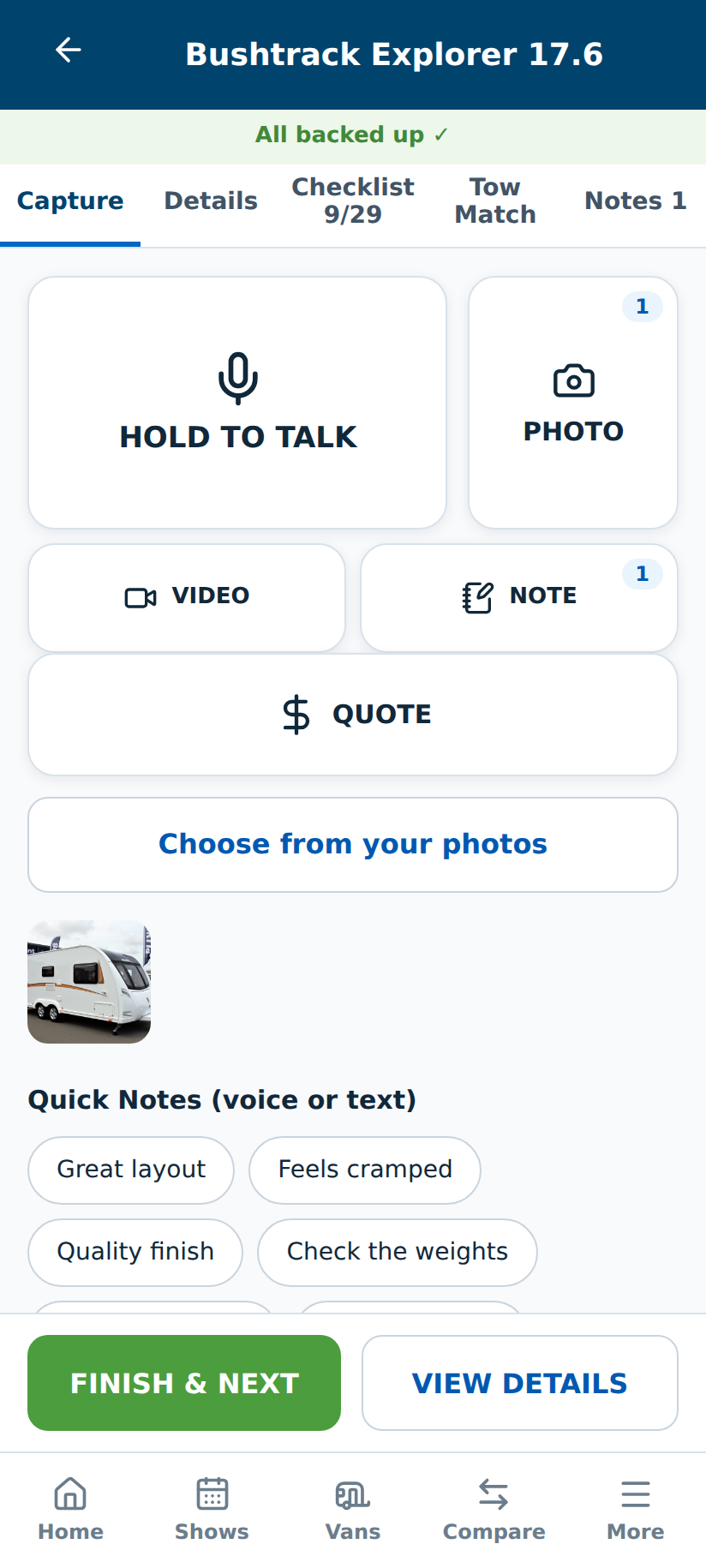
This is the part built for standing in a caravan, not sitting at a desk. Large tap targets, minimal typing, fast capture. Where a field is a pure number, like the weights on the Details tab, the phone offers its number pad instead of the full keyboard.
Photos, voice and video
Tap a tile to take a photo of the layout, the spec plate, the kitchen, whatever matters to you. Hold to record a voice note walking through your impressions out loud, or a short video of the walkthrough. On a Buyer Pass, your voice and video notes are transcribed to text automatically, usually within about fifteen minutes of your next sync, so you get a readable record without typing a word standing in a caravan.
Quick notes
A row of one-tap chips, things like "Drives well", "Quality finish", "Feels cramped", "Feels tired". These aren't just decoration. They feed directly into the Fit Score of that van later, so a fast tap at the van becomes a real signal when you're comparing your shortlist at home.
Glare and retakes
If a photo of a spec board comes out too glary to read, the app prompts a retake on the spot, while you're still standing there and can actually fix it. You can also take up to three photos of the same spec board and the app reads them together as one combined pass, rather than needing a single perfect shot.
6. The checklist
A structured checklist runs alongside capture. It opens with every section folded to its headline and a running count, so Priya sees the whole shape of the inspection at a glance and opens one section at a time rather than scrolling a wall of items. Failed checks can carry their own photo or note right there, so "the door seal was perished" has evidence attached, not just a tick.
Three of the towing and weight checks are auto-suggested from your Tow Vehicle record and the arithmetic VanVerdict has already worked out for you (see the next section), offered, never forced. The compliance plate check stays a manual visual and paperwork check, on purpose: that's not something a phone camera should quietly wave through.
7. Can you legally tow it: Tow Match
This is the feature most buyers don't think to check until it's too late. VanVerdict checks it for you, on the spot, against real arithmetic, not a rule of thumb.
Setting up your tow vehicle, once
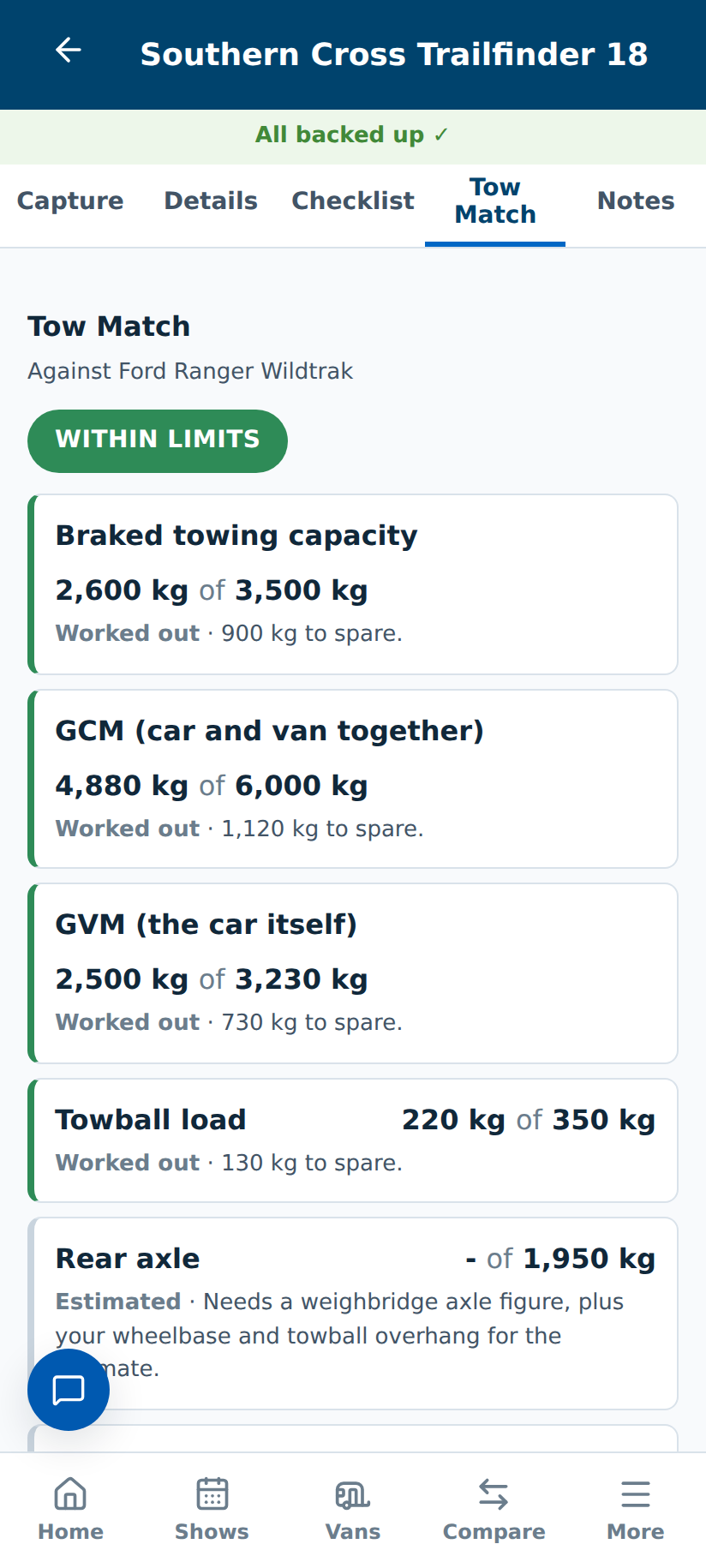
From My Tow Vehicle, Priya enters her car's make and model, its braked towing capacity, GCM and ball weight limit. That's the whole first step, four fields. From there, VanVerdict already shows a real towing result against the most recent caravan she's captured. Everything past that first step, kerb mass, permanent additions, trip load, a real weighbridge reading, sits in collapsed "Refine this" sections that tell you exactly what unlocking them buys you.
Reading the result
- Green
- Within every legal limit that's been checked.
- Amber
- Within the limits, but the margin is thin.
- Red
- Over a legal limit. Do not tow it.
- Not enough information
- Shown whenever fewer than all four checks (towing capacity, GCM, GVM, towball) have run. VanVerdict will never show you a green tick built on one check out of four. That's the single most dangerous thing this panel could print, so it doesn't.
If you've actually had the loaded rig weighed at a weighbridge, that real figure always overrules the calculated one.
The first time a caravan's ATM is entered and you don't yet have a usable tow vehicle on file, VanVerdict nudges you: "Want to know if you can legally tow this caravan?" It only asks once.
8. Your Buyer Profile and Fit Score
Tell VanVerdict what actually matters to you, layout, budget, bed configuration, storage, whatever your list is, and weight how much each one counts. Every caravan you capture then gets a Fit Score against your own criteria, not a generic star rating.
You can talk it through instead of typing it: the "tell us what you need" box on your profile takes a voice note and pulls out your criteria automatically, filling gaps you didn't get around to typing yourself.
Tap a Fit Score badge to see the actual working behind the number, including a plain +2 or -1 next to it whenever your own quick notes tipped it, always shown alongside the score, never quietly folded into the percentage. A score you can't see the reasoning for isn't one you can trust.
9. The evening review
Back at the caravan or in the hotel that night, Home shows a quiet prompt for any van captured that day still waiting on a review, a proper "quiet cuppa" pass, not another form. Photos and voice-note transcripts side by side, three short questions (would you live in it, what nagged at you, keep, maybe, or walk), and any spec you didn't quite finish filling in. Everything saves as you go. No Save button to remember.
The final answer is the one that matters. When Priya taps "Keep", that van is shortlisted on the spot: it wears a star on My Vans and climbs her ranked list. "Walk away" marks it rejected so it drops out of the running, and "Maybe" keeps it in the considering pile for another look. None of these count as checklist passes or fails, they are her verdict, not an inspection item.
The review window covers the past week, so at a multi-day show the vans from day one still wait for her on the last night. And on show days the show card on Home carries a "Review captured vans first" link whenever any are still undecided, so the review is never more than one tap away.
10. Comparing your shortlist
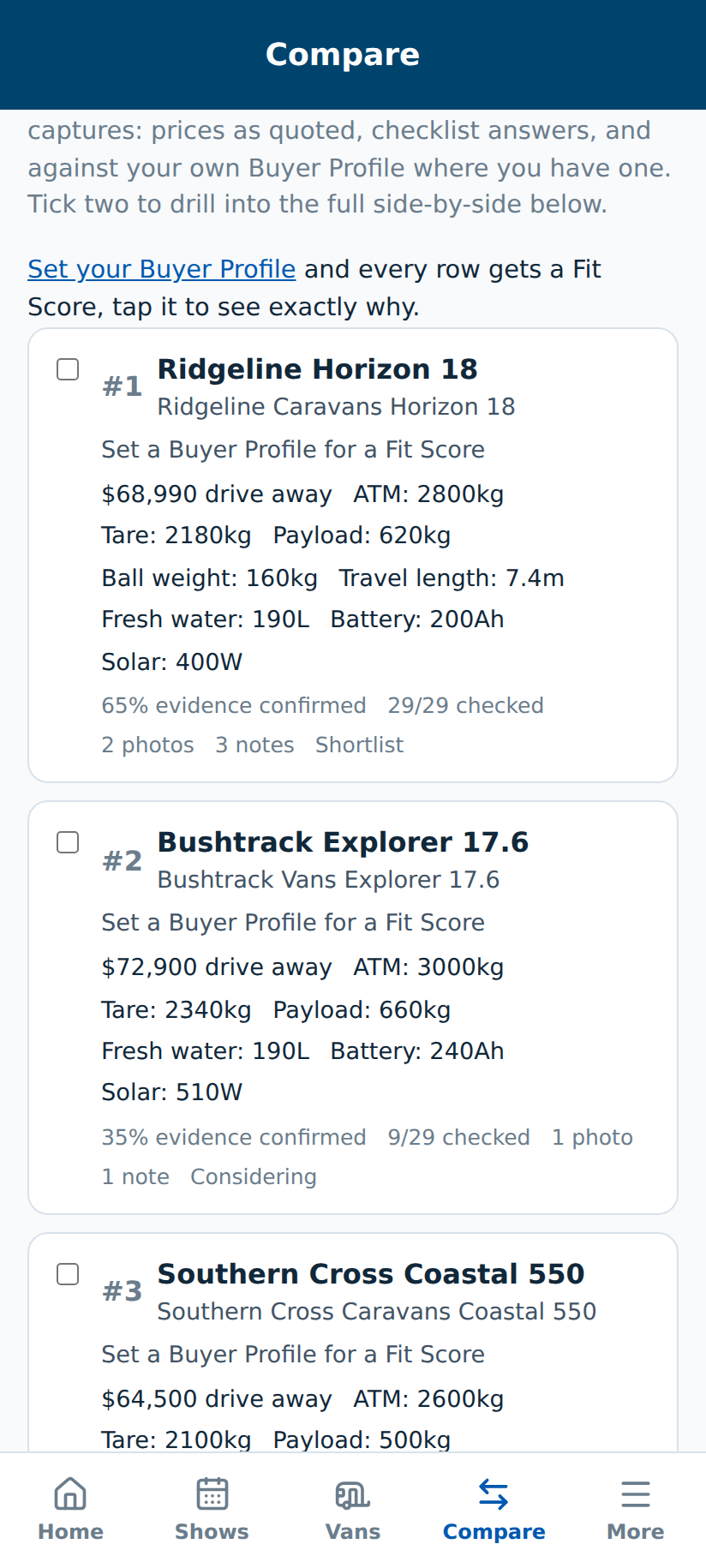
Compare ranks every van you've kept by Fit Score, side by side, with the working visible rather than hidden behind the number. This is where the show-floor blur turns back into a clear shortlist.
11. Quotes, and getting it in writing
Capturing a quote
Record what a dealer actually quoted, base price, options, inclusions, delivery, any trade-in, right against that van. Every plan can capture quotes; comparing two side by side is a Buyer Pass feature.
Like-for-like true cost
Dealers quote drive-away, tow-away, ex-yard and "from" prices, which don't compare cleanly against each other. VanVerdict normalises them onto one figure, itemising registration, CTP, stamp duty and pre-delivery against your own state, so you're finally comparing the same thing. Anything it doesn't know is shown as "unknown", never guessed as zero, and the total honestly reads "at least $X" whenever something's missing.
Get it in writing
One tap at the van turns whatever was just quoted verbally into a proper email or SMS to the dealer, with the details already filled in, so what you were told out loud becomes something you can actually hold them to.
12. The Van Report: what has this model's price actually done
Open More, then Van Report, and pick any model from the catalogue. The report shows every advertised price we have observed for it, a small price-over-time graph, and the latest move as an arrow with the dollar and percentage change. When a change in price came with a change in specification, the report never calls it a price move: it lists exactly which specs changed, before and after, so a "$1,000 dearer" that quietly gained a bigger battery reads as what it is.
Below that sits what other buyers have been quoted for the same model, grouped by basis (drive-away, tow-away and so on). It is always a range or a median, never any individual buyer's own figure, and it only appears at all once enough quotes exist to say something meaningful. Use it to walk into a yard knowing whether the number on the board is normal, high, or a genuine run-out.
Every figure in the report is an observation, not an offer. Prices vary by dealer, state, options and season, so always get a current itemised quote before deciding.
13. Find a van by what matters to you
Before Priya knows which stands to walk to, she opens Find a van (from Home, or from the search screen when adding a caravan) and sets the limits that actually decide it: budget, length in feet, ATM and ball weight, battery type, minimum solar, fresh and grey water, hot water, gas-free, bed layout, frame and roof. Anything she leaves blank is not a filter. "Use my tow vehicle" fills the ATM and ball limits from the tow vehicle already on her account, and the list shrinks to the models that fit, with a chip per limit on every card: green for a pass, red for a fail, grey for not stated. Tap a card to open that model's Van Report. It works without signing in, so you can send the link to whoever is coming with you.
The grey chip matters. Makers publish far fewer figures than you would expect, so a model with a figure missing is never dropped from the list and never guessed at. It stays in, marked not stated, as a question to ask at the stand. Tick "strict" if you only want models with every figure published. And every figure here is what the manufacturer published for the model: only the compliance plate on the van in front of you is about that van.
14. The Buyer Report and handover checklist
The Buyer Report pulls everything you've recorded on your chosen van, photos, evidence, quotes, the whole comparison, into one document you can download as a real PDF, not just a print dialog. A short buyer survey afterwards (bought it, still looking, stopped looking) helps close the loop on your own journey.
Once you've chosen a van and moved to deposit or delivery, a handover checklist builds itself from what you already recorded, every promised inclusion, every "get it in writing" message you sent, every answer on warranty and service, plus the standard items the app always includes (weighbridge ticket, keys, manuals, service book). If nothing was recorded against an item, it simply doesn't appear, no vague boilerplate list.
15. Asking the AI about a caravan
The Research page lets you ask a direct question about a caravan you've captured, drawn from evidence you've actually gathered rather than a generic answer. A small free allowance is included on every account; Show and Buyer Pass holders get a larger daily allowance. If you run out, you can top up your own AI credit from Settings for a small one-off amount, which then covers research questions, the "tell us what you need" profile interview, and the automatic spec reading from photos and brochures.
16. Shopping with a partner
Priya's partner Sam links a free account to hers from Partner in Settings. Sam then works on the same caravan data under Priya's plan, but keeps his own verdict and his own Buyer Profile weighting. The Reconcile screen shows where they agree, where they split, and exactly which criteria caused the difference, using each of their own Fit Scores, not one blended opinion. If either of them marks a must-have caravan a fail, that failure counts for the pair; everything else is averaged.
17. Plans and what each one unlocks
- Free
- Up to three caravans, full capture and checklist, a small AI allowance, quote capture, data export always free.
- Show Pass, 30 days
- Built for a single show weekend. Full research allowance, a free partner link, needs-interview and photo/brochure AI reading.
- Buyer Pass, 180 days
- The full buying journey. Everything in Show Pass, plus side-by-side quote comparison, voice and video transcription, priority processing (jump the queue on a captured photo or recording), the full Buyer Report and handover checklist.
When a pass expires, your account moves to a read-only Archive: every record stays visible and your data export stays free forever, but new capture and AI use pause until you renew.
18. Common questions
Does VanVerdict sell caravans or take a cut from a dealer?
No. It works for the buyer only, and it always will.
What happens if I lose signal at a show?
Nothing. Every capture is saved to your phone the instant you make it and syncs automatically the next time you have a connection. Even if your phone closes the app completely, reopening it with no reception still lands you on your own vans and your show plan: once you have signed in on a device, the app remembers you until you sign out. Sync Now and a full local backup export are both available if you want to check.
Can I see the actual arithmetic behind a green Tow Match result?
Yes, every figure, every one of the four checks, is shown, not just the coloured verdict.
Is my data sold or used to train anything?
No. It is yours, and data export is free forever, on every plan, even after a pass expires.